Overview
From sound to song
The active learning sequence can reasonably be described as:
These skills overlap rather than forming a strict examination ladder. Visual rewards keep repetition meaningful, while later achievement gives the learner more choice.
Transposition for comfort
High, Medium and Low
Voice level moves all expected and demonstrated pitches together: High uses the activity’s standard sounding range, Medium sounds one octave lower, and Low two octaves lower.
The musical identity, interval structure, notation position, task, scoring history and progress remain unchanged. This separates comfortable vocal tessitura from the musical concept being learned.
Pitch production
Wizard’s Garden: matching, control and range
The Garden begins with sound-production guidance, then asks the learner to reproduce individual demonstrated pitches. Feedback is based on how sharp or flat the sung frequency is relative to the current expected pitch, translated into direct visual higher/lower guidance.
Each note's progression increases the required singing duration and, at later stages, narrows the accepted pitch deviation. Early stages accumulate time sung on target; later stages require continuous singing. These are distinct demands on vocal control. Established notes are repeated for consolidation. Once sufficient strength is demonstrated at a current upper or lower boundary, the next target extends by one semitone. Success can lead to another semitone; repeated difficulty with a new boundary note triggers rescue practice on familiar nearby notes, alternating with another attempt at the blocked note. This does not mean that every failed attempt shortens the required duration or widens pitch tolerance.
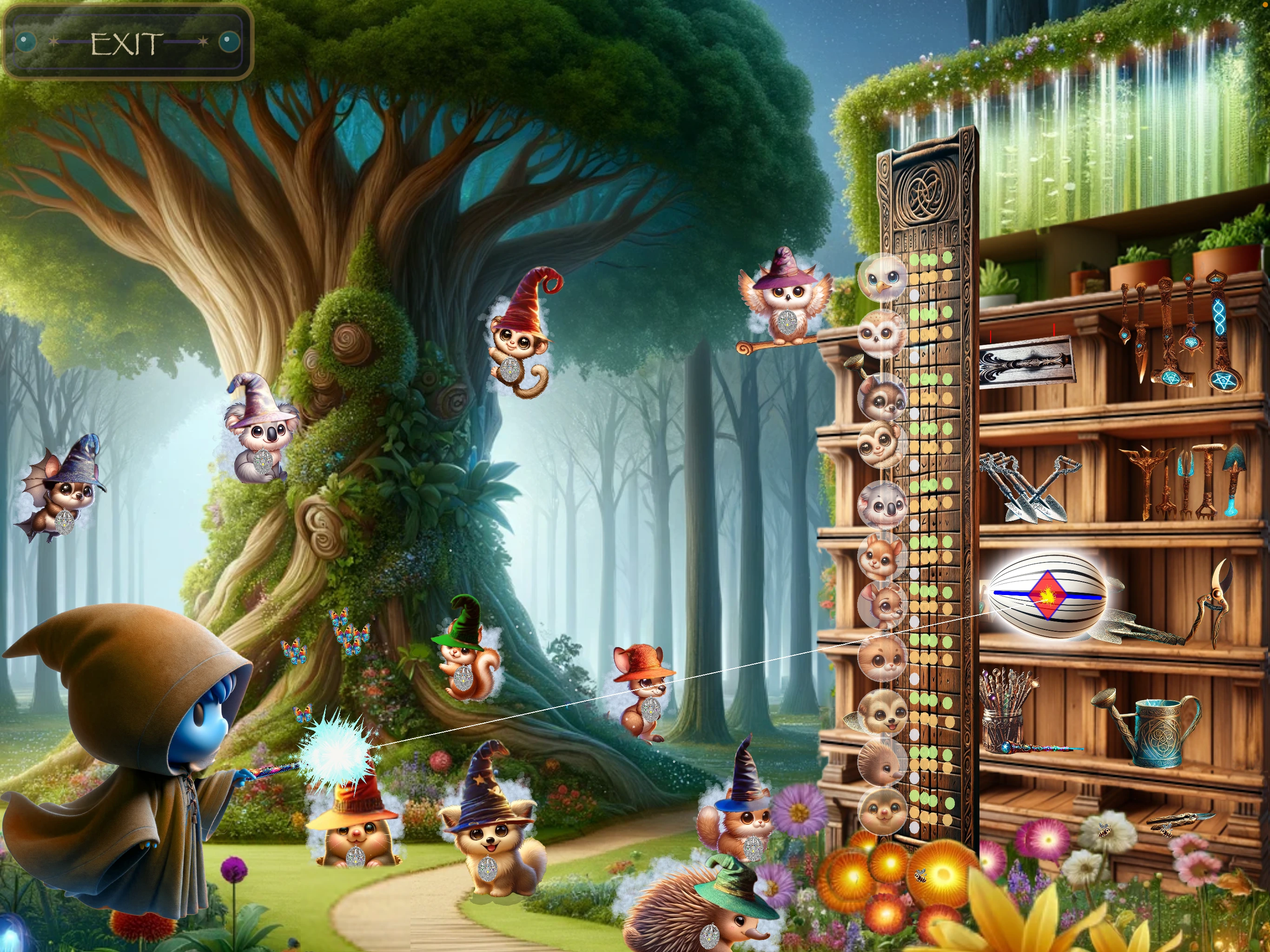
This distinguishes four things:
- the Garden’s notated note identities;
- the High, Medium or Low sounding range;
- the learner’s demonstrated successful range;
- the notes currently active in Garden selection.
Each successful semitone beyond the standard boundary adds a star to the boundary egg. The egg remains at its normal staff position; extension pitches are not displayed with accidentals.
For stronger learners, later Garden work also includes dynamics and finer pitch-control challenges.
Two-note relationships
Picture Puzzle: interval production and recognition
Picture Puzzle preserves interval identity across different starting pitches and includes ascending, descending and unison relationships. The learner first hears and produces the endpoints, then later encounters recognition-oriented tasks before or alongside full production.
Musical relationships remain the same at every voice level because both endpoints move together. Painter Studio adds earned artwork choice at the appropriate stage without changing the interval task.
Accidentals and notation
Chromatic pitches may be shown with sharps or flats in Picture Puzzle and Lava Challenge. Their spelling is part of the note and key realisation, while success remains a pitch-production task: students can follow the demonstration without prior theoretical knowledge.
Enharmonic spelling and interval identity should be discussed only when useful to the learner. The application does not require a separate theory test before singing.
See the player guide to sharp and flat signs. Demonstrations can be followed by ear.
Transfer
Lava Challenge: melody, rhythm and rests
Lava Challenge transfers pitch matching into timed melodic performance. The learner listens, follows a count-in, sings sustained note events and observes rests as silence. Song realisations may vary by key while retaining the melody’s intervals, rhythm and rest structure.
The early songs are sequenced and the first three use a deliberately accessible note range. Voice level then shifts the complete sounding range without changing the song itself.
After the available sequence is completed, Jukebox supports learner-directed replay of completed songs. This is a clear example of achievement creating choice.
What to observe
Interpreting difficulty
- Consistently sharp or flat: notice whether the learner can make small directional corrections from the visual feedback.
- Unstable sustained notes: work on breath flow and an easy vowel before asking for greater accuracy.
- Range-edge difficulty: allow rescue practice or adjust voice level; do not treat extension as a required pass/fail test.
- Correct pitches but weak song results: separate count-in, pulse, note duration and rests from pitch matching.
- Interval recognition difficulty: return to listening and producing the two endpoints before naming the relationship.
Teaching use
Using Miki Sings alongside lessons
Use the app for short, focused practice between lessons, then connect its visual language to the student’s live singing. Ask what the wand suggested, which notes felt secure, and whether difficulty came from pitch, range, rhythm or remembering the pattern.
The reward structure is educationally useful: early guidance reduces choice overload, while demonstrated achievement unlocks artwork, song and Wizard World style choices. The learner gains autonomy without bypassing the underlying task.
Technical setup
Reliable lesson setup
Use an iPad for a larger visual field; iPhone is supported. Both use landscape orientation on iOS / iPadOS 15 or later. Headphones or earbuds with a microphone are mandatory. A plug-in microphone is strongly recommended, while Bluetooth headsets with a microphone are supported. Sound-limiting headphones or earbuds are strongly recommended for children.
Keep listening levels comfortable. The app checks the headset route, then microphone permission, then verifies that microphone callbacks are working. Disconnecting the headset suspends singing evaluation rather than recording silence as poor performance.
Internet access is needed for these online pages, but normal in-app play and progress storage are device-local.